Official Site of The State of New Jersey
Families First EBT
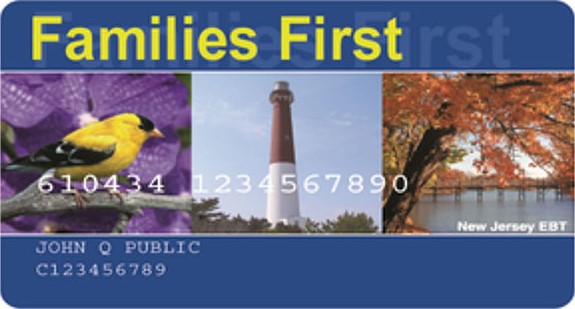
Your Families First EBT Card
SNAP and WFNJ use “Families First,” an electronic benefits transfer (EBT) card, for you to access your cash and food assistance benefits. The Families First EBT card can be used like a debit card to purchase items at authorized stores. The card also can be used to withdraw WFNJ cash benefits from Automated Teller Machines (ATMs) with the Quest® logo.
Do not throw away your card! You will receive your benefits on your card on the same date at the beginning of each month.
For more secure payments, your Families First EBT card has:
- An encrypted chip
- Tap-to pay technology
- A 3-digit security code
Your encrypted chip is located on the front of your card. At the store, you should tap or insert the card when making payments. If the chip card is not accepted by the retailer, you will be prompted to swipe your card. This payment method is less secure – we always recommend using the chip/tap feature as the best way to protect your benefits when it is available.
Your card will also have a 3-digit security code on the back to prevent fraud. It is printed on the card when issued and will not change unless you replace the card.
Using Your Families First EBT Card
Your Families First EBT card works like a debit or credit card. To pay with your benefits in the store, tap or insert your card into the machine and choose FOOD (for SNAP) or CASH (for WFNJ), then enter your pin.
You may be asked to use a second form of payment to cover any amount over what is available on your card or any items not eligible for SNAP.
It is illegal to use the Families First EBT card at any of these locations:
- Liquor Stores
- Casino Gaming
- Adult Entertainment Establishments/Strip Clubs
Where can I use my benefits?
You can use your card at participating stores, farmers markets or at an Automated Teller Machine (ATM) (WFNJ only). Look in stores for the SNAP logo or a sign that says “EBT/SNAP accepted here.”
Find a SNAP Participating Store Near You
You can also use your card online at some stores for curbside pickup or delivery. Your benefits cannot be used to pay for delivery, other service fees or tips.
Find a Store to Order Groceries Online
Did you know? You can use your Families First EBT card to receive free or highly discounted admission to arts and history organizations, venues and programs throughout New Jersey. For a list of participating organizations, visit FamiliesFirstDiscoveryPass.com.
How do I use my SNAP food benefits?
You can use your SNAP benefits to buy food like:
- Fruits and vegetables;
- Beans, fish, poultry, meat;
- Rice, bread, tortillas, cereal;
- Milk and cheese; and
- Seeds and plants that produce food.
You cannot use your food benefits to buy alcohol, tobacco, household items, vitamins and supplements, or hot and prepared food.
How do I use my WFNJ cash benefits?
Getting cash from an ATM: You can use your EBT card like a debit card to withdraw cash benefits from Automated Teller Machines (ATMs) with the Quest® logo. To get cash:
- Follow the ATM instructions for tapping or inserting your card.
- Enter your PIN.
- Choose “cash withdrawal.”
- Select “Checking.”
- Enter the amount you would like to withdraw.
- If your transaction is approved, the ATM will give you your cash and print a receipt.
You can withdraw cash three times every month without a fee. Each additional withdrawal will cost you 45 cents, which will be taken from your WFNJ cash balance.
If you receive cash assistance benefits through WFNJ, you can use your EBT card to purchase items not allowed by SNAP.
Nine months of card inactivity will trigger food and cash benefits older than nine months to be removed from your card. Once benefits are removed, they will not be replaced. If your case closes and you still have benefits left in your account, you can use your card until your balance is $0.
Online Services for Your Families First EBT Card
NJFamiliesFirst.gov and ConnectEBT
On the ConnectEBT app and NJFamiliesFirst.gov, you can:
- Activate Your Card
- Change Your PIN
- Check Your Balance
- See Your Transaction History
- Report Your Card as Lost, Stolen or Damaged
- Request a Replacement Card
- Lock/Unlock Your Card
- Sign Up for Account Alerts
Protect Your Benefits
Your SNAP and WFNJ benefits are always at risk of being electronically stolen in the following ways:
- Skimming means illegally attaching a device to a point-of-sale machine to steal EBT card information or a PIN.
- Cloning means copying stolen EBT card information to a new card.
- Scamming means convincing someone to disclose their EBT card information, often by a fraudulent phone call or text message that pretends to be from an official government agency (commonly known as phishing.)
Stolen benefits cannot be replaced.
ConnectEBT is the only official app for your Families First EBT card. Other EBT apps are not associated with Families First EBT. Do not link your Families First EBT account to any other app. ConnectEBT is secure and connects directly to your account.
Protect Your Benefits Now By:
Tap-to-Pay for a More Secure Way
Your Families First EBT card contains a chip to help keep your benefits secure. At the store, tap or insert your card for more secure payments.
Lock your card when you are not using it.
When you're not using your EBT card, use the lock feature for extra protection. You can easily “Lock Card Everywhere” NJFamiliesFirst.gov or on the ConnectEBT app. Click for further instructions.
Change Your PIN regularly
Make sure you change your PIN every month. Do not write your PIN on your card. Do not carry your PIN in your purse or wallet where someone can find it.
Immediately report your lost, stolen or damaged card so no one can steal your benefits.
ConnectEBT App

Download the ConnectEBT app in the Apple App Store or Google Play Store to check your balance, confirm your last deposit, change your PIN and review up to 12 months of transaction history. ConnectEBT is free and is the only official app for Families First EBT users.